This tutorial was written in PSP X. You should be able to achieve similar results in other versions. You may need to search for some of the effects in your PSP's dropdown lists or the Help window. Please do not offer any of the supplies for download anywhere, do not change file names, do not send the webpage through emails, and only offer a text link to the tutorial URL. I do not wish my tutorials to be translated. Thank you for your courtesy...God bless, Diana What We'll Be Using: SUPPLIES:
Patterns (or you can use your own)
More results (with thanks to my dear friend Ginny for testing!) TESTER RESULTS ~~~~~~~~~~
NOTE: Tutorial for Autumn and WK tags on this page. More "Seasons" with ALTERNATE INSTRUCTIONS
1) File/New: 650H, 450W, Background=White.
2) Have font Penguin Attack opened (if you didn't install it or place in a Fonts viewer program, just locate it on your hard drive and double click to open, then minimize. You will now be able to find it in your PSP Text Tool's dropdown list). Here are my settings below. Different letters, fonts and/or different sizes will give unique variations.
Type the first letter of your name/word and move it to the left of your canvas.
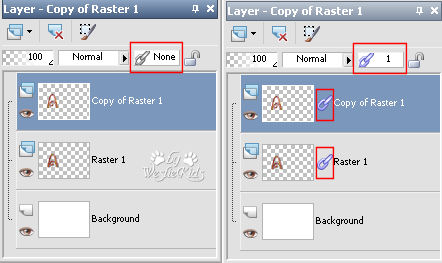
3) Hide the top/duplicate layer (click on the "eye" in Layer Palette - this is the Visibility Toggle) then click on the bottom/original text layer to activate it.
Click OK to apply.
4) Click on your Magic Wand, settings below:
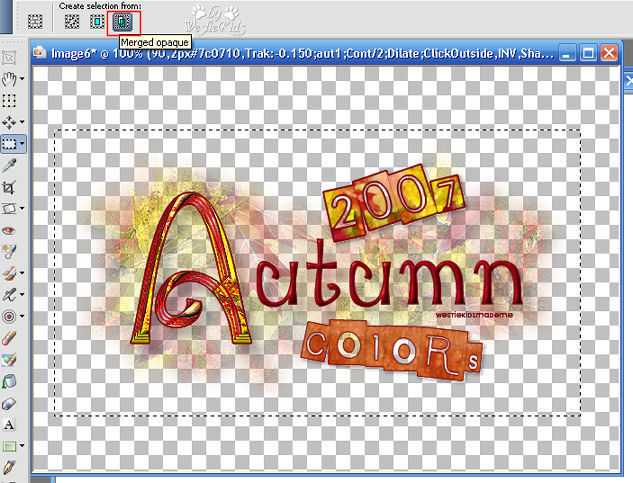
Click outside of your letter, anywhere on the canvas, then Selections/Invert.
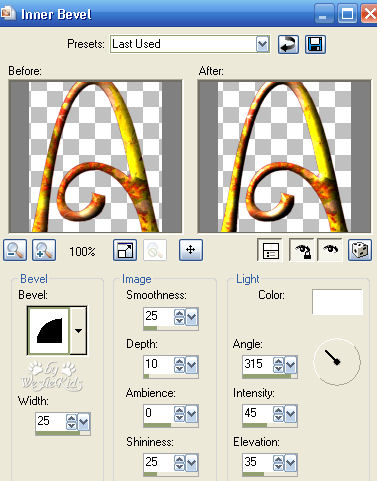
Effects/3D Effects/Drop Shadow: Vertical and Horizontal=10; Opacity=20; Blur=10.00; Color=#000000; Shadow on new layer is UNchecked.
5) Click on the top/duplicate layer to activate and UNHide it.
While still selected:
6) Click on your Text Tool and then swap the Foreground and Background in your Material Palette (use those double headed arrows).
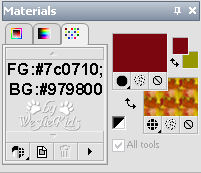
7) Click on your Text Tool again then swap your Material Palette colors back, opening the closed color. Foreground: #7c0710, Background #979800 and have the pattern showing (just like when we started). We'll now use the second font, Earwig Factory, that I used for my "2007" text. Note that the numbers and letters for this font will be transparent (stroke color will outline the box and the letters/numbers while your pattern will color the area surrounding the letters/numbers). Settings below:
Note: Depending on the letters you choose, you may want to change the value in the Tracking box. For "2007" I wanted them to slightly touch/overlap. So to move the letters horizontally closer together you use a minus value; for further apart you use a plus value. (If you enter 2 or more lines of text, you would change values in the Leading box which moves them closer or further apart vertically).
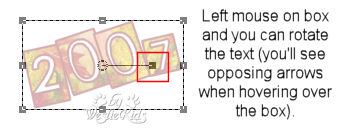
While text is still Vector, you can click on the box/rocker arm (see below) to rotate it without causing any distortion (I only lowered opacity on the text so you could easily see the rocker arm).
Once your text is moved into position, Convert to Raster Layer.
8) Selections/Select All.
9) For the "colors" text I changed the Pattern to wk_seamless-autumn2.jpg (Angle 0, Scale 50), Foreground is still #7c0710.
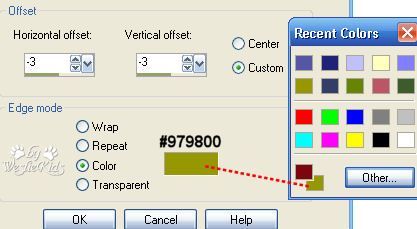
10) In your Layer Palette, click on the bottom (Background) layer to activate.
After I finished painting I added Effects/Edge Effects/Enhance. Depending on pattern you're using you may want to skip that effect.
11) Hide bottom (Background), white layer.
Image/Crop to Selection (this removes the excess white background, making our tag smaller). Our separate layers are still intact if we want to reuse later.
12) All you need to do now is add your watermark or if you don't have a watermark, just add your "created by yourname/nickname" line somewhere with a smaller size text/font. Your new tag is done.
* Below with just initials, size 250. I entered each letter separately so I could move the K down, then closed my background and merged/visible before duplicating the layer in Step 2:
NOTE: Tutorial for Autumn and WK tags on this page. More "Seasons" with ALTERNATE INSTRUCTIONS I hope you have enjoyed this tutorial and perhaps learned a little something from it. If you would like to send me an email with your results, I would be delighted to see them. ..God bless, Diana ~~~~~~~~~~
DISCLAIMER: In accordance with Title 17 U.S.C. Section 107, any copyrighted work on this site is distributed under fair use without profit or payment to those who have expressed a prior interest in receiving the included information for non-profit research and educational or criticism purposes only. http://www.law.cornell.edu/uscode/17/107.shtml
Created 09/10/07 |